
SKILLPHASE BUILD NOTE 6 minute read
How we built Skillphase’s website enquiry system

We built Skillphase’s enquiry flow around a durable receipt: save the request, preserve its context and deliver it to the selected CRM separately. This build note shows the architecture, the CRM adapter checks and the final launch step.
The problem: a form response is only the first handoff
Our own website is the first place we can show the method. A visitor explains a business problem; the request needs to survive a browser retry, reach the CRM with its context and give the person responding a useful starting point.
We separated capture from CRM delivery. The website can acknowledge a saved enquiry without pretending that every downstream step has finished. If the CRM is temporarily unavailable, the delivery job remains something the operator can inspect and recover.
This is Skillphase’s own implementation, not a customer engagement or a measured revenue result. Skillphase CRM now runs on a private hosted server with its owner workspace and branding, and the intake service and its scheduled delivery worker run beside it. The website form stays off until a final end-to-end submission is verified; until then, visitors can book a fit call or use WhatsApp or email.
The architecture, from form to follow-up
The first three steps determine whether the website can return an acceptance receipt. Delivery then runs independently. In production, a PostgreSQL transaction saves the submission and its delivery job together, so an enquiry is never acknowledged without being stored.
01 — Capture and receipt
Website enquiry
The visitor shares contact details and a short business challenge. The selected service and optional referral source travel with the request.
Validate the request
The API checks origin, fields and request size. A stable submission key recognises a repeated attempt. Live mode also requires a valid anti-bot challenge.
Save before accepting
Store the encrypted enquiry and delivery job. Only a successful save produces an acceptance receipt.
Back to the visitor: a stable receipt for the saved enquiry. This confirms capture, not a booked call or completed CRM delivery.
02 — Independent delivery
Process the queue
A separately scheduled worker delivers queued requests. Temporary failures wait for a retry; unresolved problems remain visible for review.
Deliver to the CRM
The adapter checks the workspace schema, matches or creates a person, then adds and links the enquiry note using stable identifiers.
Owner takes the next action
Each enquiry becomes an opportunity owned by Nader, with a follow-up task due within one business hour, so the next action is visible from the start.
What the visitor actually sees
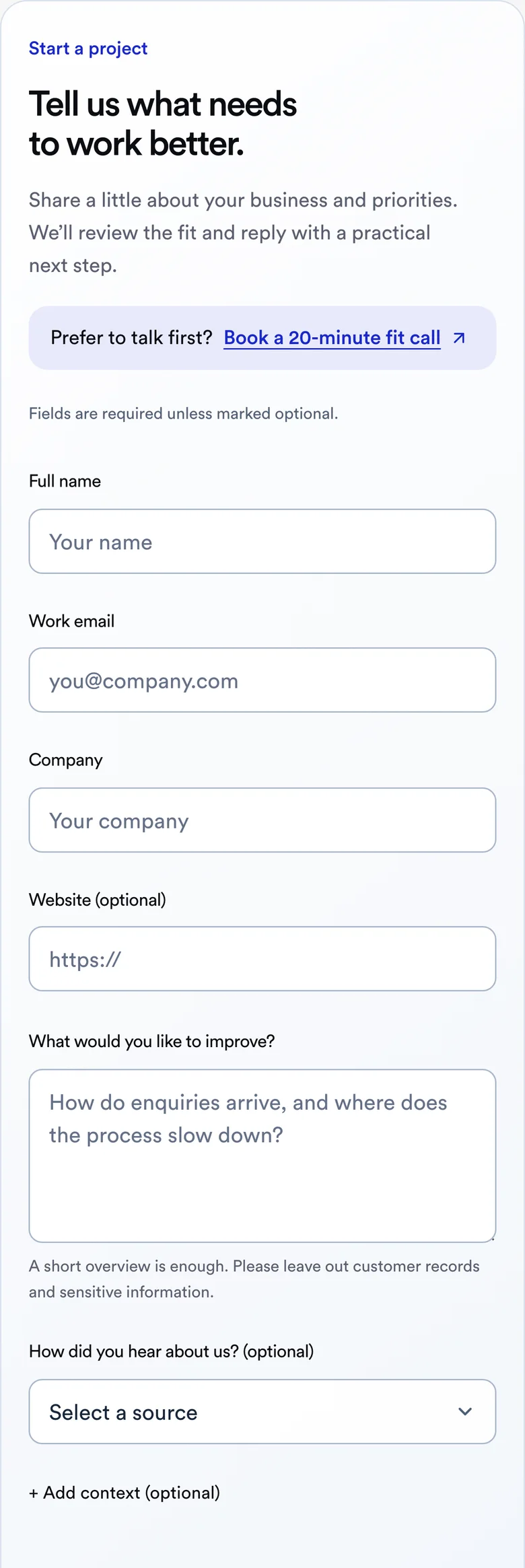
The form asks for enough context to start a fit conversation. It keeps the visitor’s details in place if saving fails, shows field-level errors and offers a 20-minute fit call for anyone who would rather talk first.
The screenshot below shows the live form on skillphase.com with empty fields, so no customer details are shown. The receipt flow is also exercised in the automated checks linked at the end of this page.
The failure cases we checked
The most useful checks exercise what happens when a request is repeated or a downstream response disappears. The downloadable test record lists the actual local results and their scope.
- Repeated submission: simultaneous requests with the same key return one receipt and leave one encrypted enquiry and delivery job in the development store.
- Changed request: reusing that key with different details returns a conflict instead of silently replacing the first enquiry.
- Storage unavailable: the API returns a retryable failure rather than a success message.
- CRM response lost after a write: mocked adapter checks reconcile the stable record identifier before creating another person, note or link.
- Ambiguous CRM identity or schema mismatch: delivery stops for investigation instead of choosing an arbitrary contact or guessing the data model.
- Existing contact: the adapter preserves existing CRM fields and records the new enquiry as a linked note.
What is working, and what comes next
Working: the enquiry form, server validation, encrypted storage, stable receipts and automated tests of the CRM adapter. In production, Skillphase CRM, the intake service, its PostgreSQL queue and a delivery worker that runs every minute are hosted on a private server.
The last step before live intake is a controlled end-to-end submission from the public website to the CRM. Each delivered enquiry becomes a person, a linked note, an opportunity owned by Nader and a follow-up task. The adapter does not send messages to the visitor; replies stay with a person.
The interactive workflow elsewhere on the website shows the wider journey. This page documents the implementation behind it, so you can see exactly how each part is built and tested.
How this becomes a first project for your business
Start with one enquiry source, one CRM and one person responsible for the handoff. Agree the information that must arrive, the next action and how a failed delivery will be noticed. Then test the repeated, delayed and failed cases before adding more channels.
For a service business, that first source might be a quotation form, a consultation request or a viewing enquiry. The field mapping and ownership rule should fit that buying journey. The useful outcome is a process your team can inspect and operate.
Sources & further reading
Recorded from synthetic local tests. The receipt and storage checks use the development store; CRM responses are mocked. This record does not establish an external connection or production availability.
Map one enquiry journey with us
Tell us where enquiries arrive, who handles them and which handoff is hardest to track. We’ll use that to discuss a focused first scope.